
CountDown Voice Timer

iPhone / iPad · iOS 18.1+

Keep moving.It counts out loud.

It says each number out loud as it counts up or down, so you can track reps and sets during a workout or stretch without looking at the screen.

Download on the App StoreFree (with ads and in-app purchases)

Scan with your iPhone

CountDown Voice Timer

When it helps

What it does

  1. 01

    Numbers, spoken aloud

    Switch between count up and count down, and each number is spoken. Count down goes all the way to 0.

  2. 02

    Every 5th or 10th number

    Choose to hear every number, or only every 2nd, 3rd, 5th or 10th. The target is always spoken.

  3. 03

    Speed, pitch and interval

    Adjust speaking speed, pitch and the interval between numbers (0.5 to 5 seconds) with sliders.

  4. 04

    Sets counted for you

    When the count reaches the end, it returns to the start and begins the next set. Completed sets are shown on screen.

  5. 05

    Speaks 32 languages

    Choose the voice language from 32, including English, Japanese, Spanish and Chinese.

  6. 06

    Saved routines

    Save the target, mode and voice settings together, then start from the list with one tap.

In detail

Counts out loud for you
01

Counts out loud for you

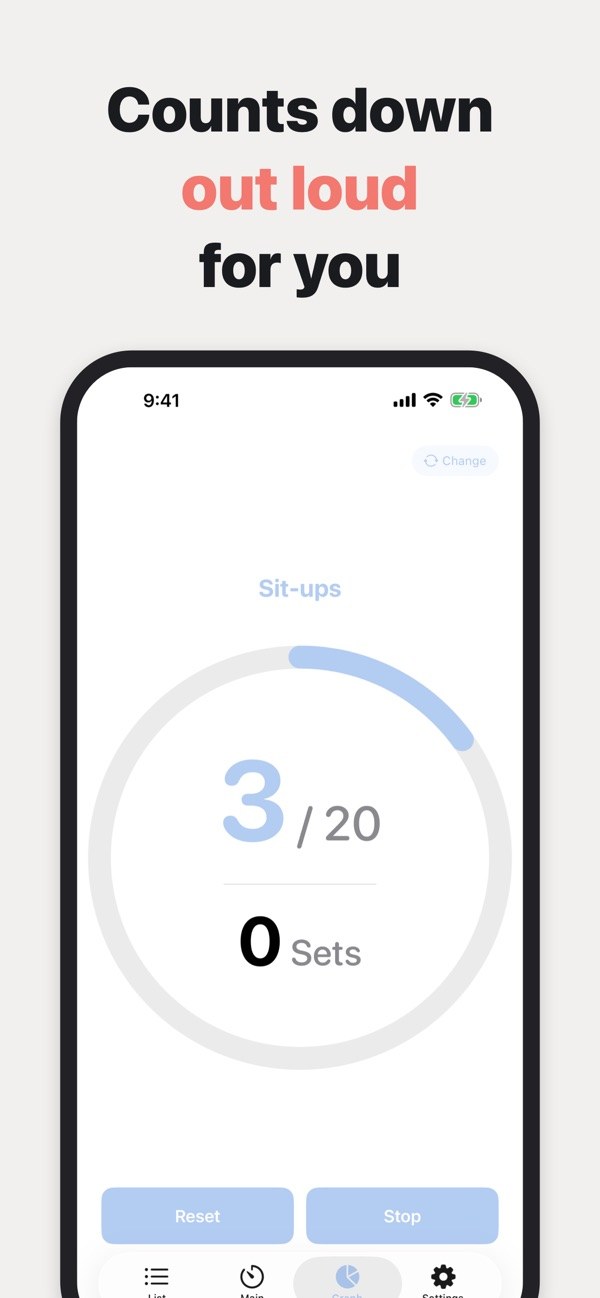
Switch between count up and count down, and each number is spoken. The screen shows the current number, the target and your set count inside a circular gauge.

  • Count up starts at 1; count down starts at the target
  • Count down also says 0
  • Auto-lock is paused while counting
Hear only the numbers you want
02

Hear only the numbers you want

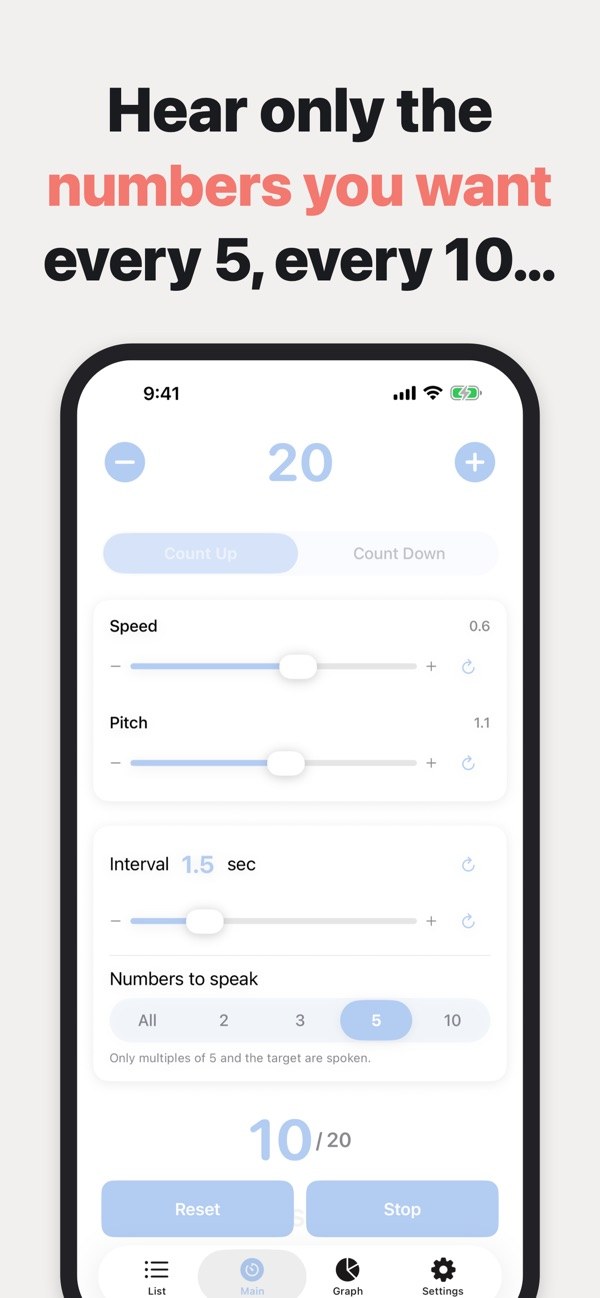
With Numbers to speak, choose All, 2, 3, 5 or 10. Only multiples of that number and the target are spoken, while the count itself still moves one step at a time.

  • Example: counting down from 60 by 5s says 60, 55, 50 and so on
  • The target is always spoken
  • Changes take effect while counting
Tune the voice to your pace
03

Tune the voice to your pace

Adjust speaking speed, pitch and the interval between numbers with sliders. Each one has a button to reset it to the default.

  • Speed 0 to 1, pitch 0 to 2
  • Interval from 0.5 to 5 seconds
  • Target from 1 to 1000, set with the plus and minus buttons
Sets are tracked automatically
04

Sets are tracked automatically

When the count reaches the end, it returns to the starting number and begins the next set. The number of completed sets is shown on screen.

  • Reset and Stop buttons
  • Resetting mid-count does not stop it
Save a routine, start with one tap
05

Save a routine, start with one tap

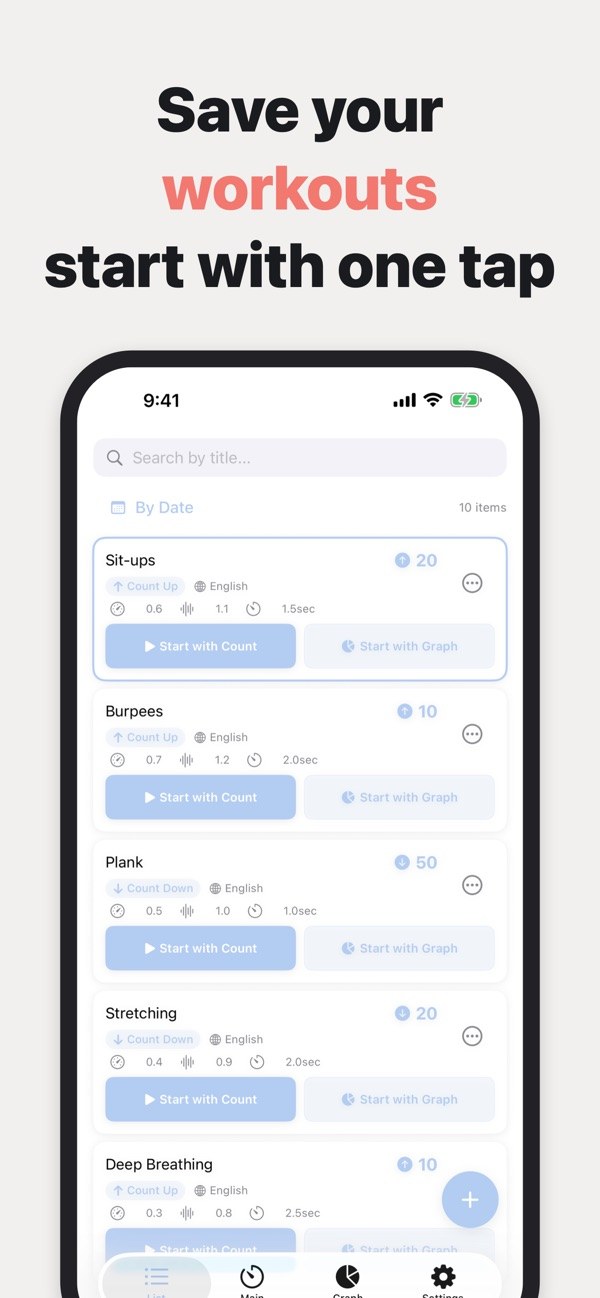
Save a title, target, mode, voice language, speed, pitch and interval together. The list can be searched by title and sorted by date or name.

  • Start with Count from the list
  • Duplicate a preset
  • Preview before saving
06

A notice when you cannot hear it

If the volume is at zero, or the voice for the selected language is not on your device, the app tells you. You can choose the voice in Settings.

  • Settings lets you pick the voice language and appearance (System, Light, Dark)
  • The voice language becomes the default for new presets

How it works

  1. 1
    Create a routine

    Create a routine

    Tap the plus button in the list, then set the title, target, count up or down, and voice before saving.

  2. 2
    Fine-tune the speech

    Fine-tune the speech

    On the Main screen, adjust speed, pitch, interval and which numbers are spoken. Change the target with the plus and minus buttons.

  3. 3
    Start counting

    Start counting

    Tap Start with Count in the list, or Start on the Main screen, and the numbers are spoken.

  4. 4

    Stop or reset when you finish

    Stop pauses the count and Reset returns to the first number. Each time the count completes, your set total goes up by one.

Screens

Current count and sets

FAQ

Is it free?

It is free to download, with ads and in-app purchases. The free version limits how many presets you can save and offers a limited set of theme colors.

What does Premium include?

Premium removes the limit on saved presets and adds progress graphs, all theme colors and an ad-free experience. There are monthly and annual plans, and the app offers a 7-day free trial.

Which languages can it speak?

32 languages, including English, Japanese, Spanish and Chinese. If your device lacks a voice for a language, add one in the Settings app or choose a different voice.

Can it say only every 5th or 10th number?

Yes. Under Numbers to speak, choose All, 2, 3, 5 or 10. Only multiples of that number and the target are spoken.

What if I cannot hear anything?

Check that your volume is not at zero. The app shows a notice when the volume is zero or when the voice for the selected language is missing from your device.

Does count down say 0?

Yes. Count down says the target at the start and continues to 0. After 0 it returns to the target and your set total goes up by one.

Does the screen dim while counting?

The app is built to pause the screen's auto-lock while counting.

Where is my data stored?

Data and settings you enter are stored on your device. The app uses Google AdMob to show ads and RevenueCat to manage purchases. See the privacy policy for details.

Let the voice keep count.

Download on the App Store
CountDown Voice TimerGet